Copy Photos to Android Without Changing the Date
A normal USB "File transfer" copy stamps photos with today's date. How to copy photos from a computer to an Android phone so every photo keeps its own date.
To copy photos to an Android phone without changing their dates, copy them with adb push instead of the normal "File transfer" mode. adb push keeps each file's date; a "File transfer" (MTP) copy sets it to the moment of the copy. Photos with a date taken inside them look right either way. Photos without one, such as screenshots, scans and chat images, only keep their place in the gallery with adb push.
Why a normal copy changes the date
When you plug a phone into a computer and choose File transfer, the phone shows up as a drive. Underneath, it is not a drive. It speaks MTP, a protocol that copies the content of a file and lets the phone decide the rest. The phone stamps each new file with the current time.
The gallery then sorts each photo by its date taken. That date lives inside the photo, so MTP cannot change it. But many photos have no date taken:
- screenshots and screen recordings
- images saved from WhatsApp, Telegram, Signal and browsers
- scans and edited copies
- most videos from other apps
- photos whose metadata a program removed, as Google Takeout often does
For those the gallery uses the file date. After an MTP copy, that is today. Ten years of screenshots end up in one block on the day you copied them.
We tested this with 1,296 photos copied to a vivo phone over MTP: every file got the date of the copy.
The way that keeps dates: adb push
adb is Google's free command-line tool for talking to an Android phone. Its push command copies files and keeps their dates. You need it once, then the copy is one line.
- Turn on USB debugging on the phone. Settings, About phone, tap Build number seven times, then Settings, Developer options, USB debugging. Brand by brand: how to turn on USB debugging.
- Get adb. Download "SDK Platform-Tools" from Google's Android developer site and unzip it. On Linux, your package manager has it as
adborandroid-tools. - Connect the phone, unlock it, and tap Allow when it asks "Allow USB debugging?". Check it is seen:
adb devices- Copy a folder into
DCIM, where every gallery app looks:
adb push "C:\Users\you\Pictures\2016" /sdcard/DCIM/On a Mac or Linux the path looks like ~/Pictures/2016. adb copies the whole folder with its subfolders.
- Let the gallery look again. New files usually show up within minutes. To make it immediate on Android 10 and later:
adb shell content call --uri content://media/ --method scan_volume --arg external_primaryCheck it worked
adb shell stat -c '%y %n' "/sdcard/DCIM/2016/*"Each file should show its own date, not today. Then open the gallery and scroll back: photos sit on their real days.
Three traps
Names that differ only in capitals. A phone's storage ignores case. IMG_0001.JPG and IMG_0001.jpg from two cameras are the same name on the phone, and the second copy silently replaces the first. In our test, 43 photos would have been lost this way. Rename one of each pair before copying.
Space. A phone does not warn you while you copy. Check the free space first: adb shell df -h /sdcard.
Files that already have the wrong date on the computer. adb push keeps the date the file has. If that date is already wrong, for example after a download or an unzip, fix it first or set it on the phone afterwards. See fixing photo file dates on Android with adb.
The same without a command line
Photo Date & Metadata Fixer has an Android Phone tab on Windows (the Android option is Windows only). It walks you through USB debugging step by step, downloads Google's adb for you, and then sends folders, Google Takeout exports or .zip archives to the phone with every date right.

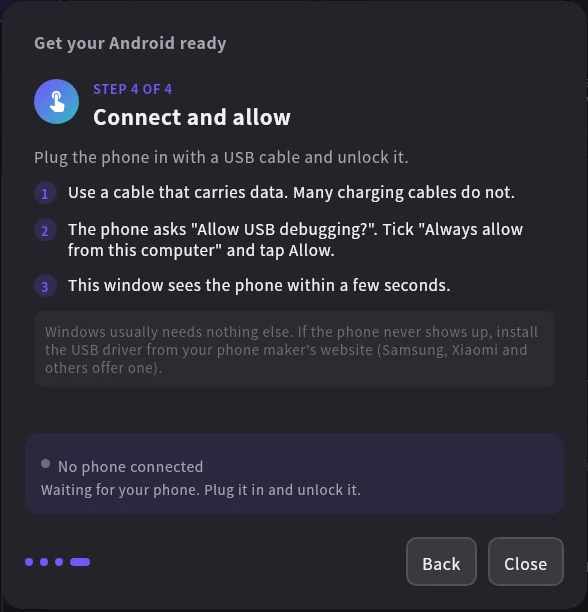
Before sending, it reads the date taken of each photo and uses it as the file date on the phone. That also fixes photos whose file date was already wrong on the computer. It renames clashes like IMG_0001.JPG and IMG_0001.jpg instead of overwriting, skips photos already on the phone, checks the free space first, and asks the gallery to look again at the end.
Frequently asked questions
Does Samsung Smart Switch keep the dates?
Smart Switch moves data between phones, and it keeps dates in that case. For photos from a computer it is not the tool. Use adb push or the app.
Does an SD card keep the dates?
Copying to a card in a card reader usually keeps file dates, because the computer writes the card directly. Then move the card into the phone. Not every phone takes a card anymore.
Do I have to leave USB debugging on?
No. Turn it off in Developer options when you are done. You can also turn Developer options off completely.
Will the photos upload to Google Photos?
If Google Photos backs up the folder you copied into, yes. Turn backup off first if you do not want that.